At Barr Beacon School, we use a variety of trusted online platforms to support your child’s learning and to keep you informed, as parents and carers. These tools help us enhance classroom experiences, provide access to learning at home, and ensure regular, effective communication between school and home. Below, you will find a guide to each platform we use, along with information on how to access and use them.
Class Charts is a user-friendly platform that allows schools and families to stay closely connected. At Barr Beacon School we use Class Charts to issue homework assignments, award positive behaviour points and issue detentions if needed.
Class Charts as a Parent
- Through your Class Charts Parent Account, you will be able to:
- Receive behaviour updates and rewards information
- View details on any detentions that have been set, including the date they are to be sat and the detention’s duration
- Track and read details of your child’s homework
This system will provide real-time updates and a way for you to stay informed about your child’s homework and behaviour.
Class Charts can be accessed online via their website, www.classcharts.com, or via their parent app which is available to download for all mobile devices.
HERE is a video introduction to Class Charts, additional information is also available in our Quick Start Guide.
------
Class Charts as a Pupil
All pupils will be issued with their unique access code to be able to view their Class Charts account. Class Charts can be accessed online via their website, www.classcharts.com, or via their student app which is available to download for all mobile devices.
Pupils will be able to view their homework assignments and submit completed assignments as required. Some teachers may still ask pupils to complete assignments in their exercise books. All details of the task and any additional information will be provided via Class Charts.
HERE is a video introduction to Class Charts for Pupils, additional information is also available in our Quick Start Guide to Completing Homework on Class Charts.
At Barr Beacon School we use the Matrix app as a central tool for school communication, monitoring attendance, and reporting pupil absences. Parents and carers can receive important updates directly from the school, check daily attendance records, and quickly notify us of any absences. The app is easy to use and helps ensure that we stay connected with families. We encourage all parents to download the Matrix app and enable notifications to stay informed and up to date.
A guide to using the Matrix App is available HERE.
For additional support, please see our Frequently Asked Questions HERE.
At Barr Beacon School, pupils have access to a range of high-quality online platforms to support both homework and independent learning. These resources are designed to help pupils reinforce their classroom learning, practise key skills, and track their progress. The table below highlights the main subject areas in which each platform is used, however they may be utilised elsewhere throughout the year.
- Seneca - Humanities (Geography, History, RE), Computer Science
- Educake - English
- Dr Frost - Maths
- Language Nut - French and German
- Pearson Active Hub - French and German
Below, you will find guides to help pupils make the most of these platforms.
Some subjects at Barr Beacon School make use of Seneca Learning, an interactive online platform designed to help pupils embed and revise content across all key stages. Seneca offers a variety of engaging, personalised resources and quizzes that adapt to each pupil’s progress, making it an effective tool for revision. Pupils can use Seneca independently, at home, to reinforce their learning and support their revision. Alternatively, they may be directed to complete specific tasks as part of their homework.
This platform is a valuable resource for ensuring that pupils stay on top of their studies and are fully prepared for assessments.
A guide to using Seneca is available HERE.
Educake is an online learning platform used by our school to support homework and revision across several subjects. It allows pupils to complete short, auto-marked quizzes that help reinforce what they’ve learned in class. Educake is accessible from home, making it a convenient and effective tool for independent study and homework.
A guide to using Educake is available HERE.
For further information about how to use Educake, a walkthrough video is available HERE.
We use Dr Frost Maths as a key online learning platform to support our pupils in Key Stage 4 and Key Stage 5 Maths. This provides a wide range of exam-style questions, detailed video tutorials, and feedback tools that help pupils deepen their understanding and prepare effectively for GCSE and A-Level assessments.
Dr Frost Maths also allows teachers to track progress and tailor support to individual needs, making it an invaluable part of our approach to teaching higher-level mathematics.
A guide to using Dr Frost Maths is available HERE.
At Barr Beacon School, we use Language Nut to support pupils in Year 7, 8, and 9 with their French and German studies. This engaging online platform is used regularly for homework and is also available for independent learning, helping pupils to develop their vocabulary, grammar, listening, and reading skills.
With a wide variety of interactive activities, games, and challenges, Language Nut is a valuable tool that reinforces classroom learning and encourages pupils to take ownership of their language development.
A guide to using Language Nut is available HERE.
To support language learning we use Pearson ActiveHub, an interactive online platform where Key Stage 4 pupils complete their Languages homework. ActiveHub provides engaging activities that help reinforce vocabulary, grammar, listening, and reading skills in French and German. Homework tasks are set regularly by teachers and are tailored to match what pupils are learning in lessons. The platform gives instant feedback, allowing pupils to learn from their mistakes and track their progress over time.
A guide to using Pearson Active Hub is available HERE.
SharePoint is your main online learning hub. From home, you can use SharePoint to access everything you need to support your learning, homework and revision.
What can I access through SharePoint?
§ Quick Links will take you directly to useful websites and platforms, including Sparx for homework and Class Charts for checking your timetable, homework and behaviour information.
§ School Email, allowing you to keep up to date with messages from your teachers and communicate with school when needed.
§ Department Pages contain useful resources to support your learning at home. These may include knowledge organisers, lesson resources, revision materials and other helpful documents. Make sure you check your department pages regularly to help you prepare for lessons, complete homework and revise for assessments.
Whether you are completing homework, revising for an assessment, checking an important message or looking for resources to help you understand a topic, SharePoint is the place to start.
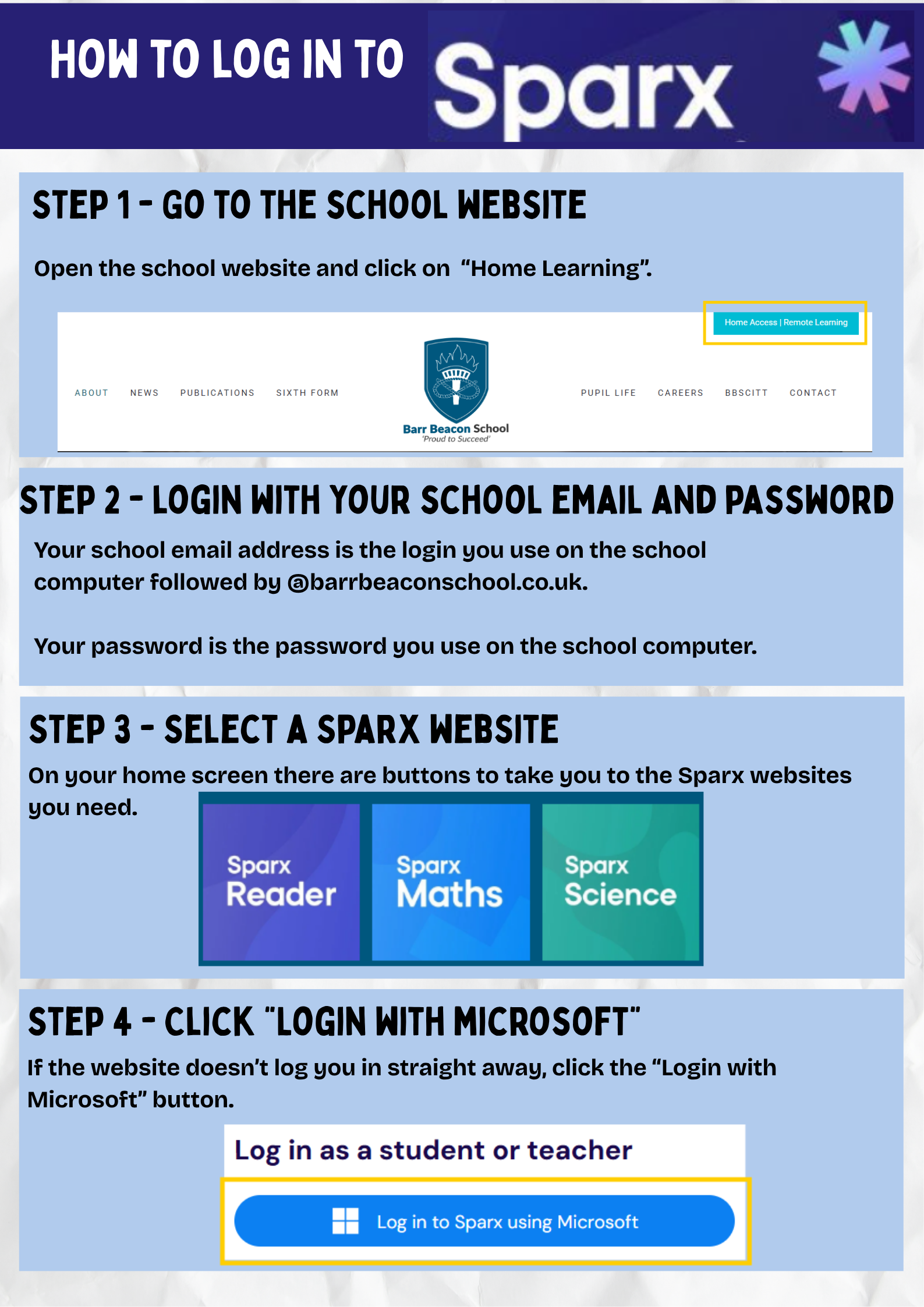
Click HERE for a guide for accessing Share Point and Sparx.
Sparx Maths is an online platform that you will use regularly for your Maths homework. It is designed to help you practise the skills you learn in lessons and develop your knowledge of key mathematical concepts.
Your Maths teacher will set homework through Sparx Maths. Each question includes a video tutorial of how to answer similar questions to help you if you are stuck.
You can use Sparx Maths for more than your homework. The independent practise section gives you the opportunity to practise the topics and skills you have been learning in class and to prepare for assessments. Regular practice will help you remember key methods and improve your mathematical skills.
If you get a question wrong, Sparx Maths provides support to help you understand where you went wrong. Use this feedback to correct your mistakes.
For information on how to access and use Sparx Maths, please watch the video HERE.
Sparx Reader is an online reading platform that you will use for your English homework. However, it is much more than just a homework tool — it is also a great way to develop your reading skills and discover new books.
Your English teacher will set reading homework through Sparx Reader. Make sure you check the platform regularly and complete your assigned reading.
Sparx Reader also provides an opportunity to read regularly and develop your vocabulary, comprehension and confidence as a reader. The more you read, the more you can discover and learn.
You will have access to a large library of e-books, with a wide range of titles and genres to choose from. Whether you enjoy adventure, mystery, fantasy, science fiction or realistic stories, there is something for everyone.
Reading regularly is one of the best ways to improve your literacy and support your learning across all subjects.
For information on how to access and use Sparx Reader, please watch the video HERE.
Sparx Science is an online platform that you will use regularly for your Science homework. It is designed to help you practise the knowledge and skills you learn in lessons and develop your knowledge of key scientific concepts.
Your Science teacher will set homework through Sparx Science. If you get a question wrong, Sparx Science provides support to help you recap the topic. It will then ask you some different follow up questions to check you've grasped the content.
You can use Sparx Science for more than your homework. The independent practice section gives you the opportunity to practise the topics and skills you have been learning in class and to prepare for assessments. Regular practice will help you remember key scientific knowledge and improve your understanding.
For information on how to access and use Sparx Science, please watch the video HERE.
Need Help?
If you are experiencing any issues accessing or using these platforms, please don’t hesitate to contact us.
💬 Encourage your child to speak to their form tutor or subject teacher.
📧 Email: postbox@barrbeaconschool.co.uk
We’re here to help you stay connected and informed.
_________________________________________________________________________________
School Closure
In accordance with the update to Department for Education guidance in August 2024 Barr Beacon School will consider how education is to continue in the unlikely event of the following:
School closures or restrictions on attendance, where school access for pupils is restricted
Individual cases where a pupil is unable to attend school but is able to learn
Full details of our Remote Learning Strategy can be found HERE.
Additional support is available HERE on how to use Microsoft Teams to access learning materials and stay engaged with lessons in the event of a school closure.